

FeatureAI inside
Coaching
A personal, AI-powered study coach for every student.
Last updated: August 17, 2026

AI automatically builds your weekly study program based on your gaps, goals and calendar, and you track your progress lesson by lesson and topic by topic. Your exam goal (score, net correct answers, ranking) and your study goal (time, number of questions) are tracked separately, with weekly and monthly progress reports showing exactly where you stand. In the Premium tier, your private tutor's referral code automatically connects you to a coach, while in the Elite tier you send a request to a coach you choose from a directory, then schedule sessions and message directly once approved. Your coach can be from a different institution, and even if your subscription pauses temporarily your coaching record isn't deleted, it automatically reactivates once payment resumes.
Live preview
Try both sides of coaching: drag your daily target, have the AI build the programme, mark a day complete; then schedule a session in the coach panel, open the weekly AI report and inspect the student's performance panel through the coach's eyes.
Set your daily target
These two sliders save the TARGET, they do not build the programme. The programme is generated by a separate button — that is the split in the product too.
Your target is saved. The programme is generated only when you ask; the AI never rewrites your plan on its own.
Weekly study programme
You do not have a programme yet. Set your target, then press "Generate with AI".
Step 1/4 · Set your target
Drag the daily time and question targets; the sliders only set the target.
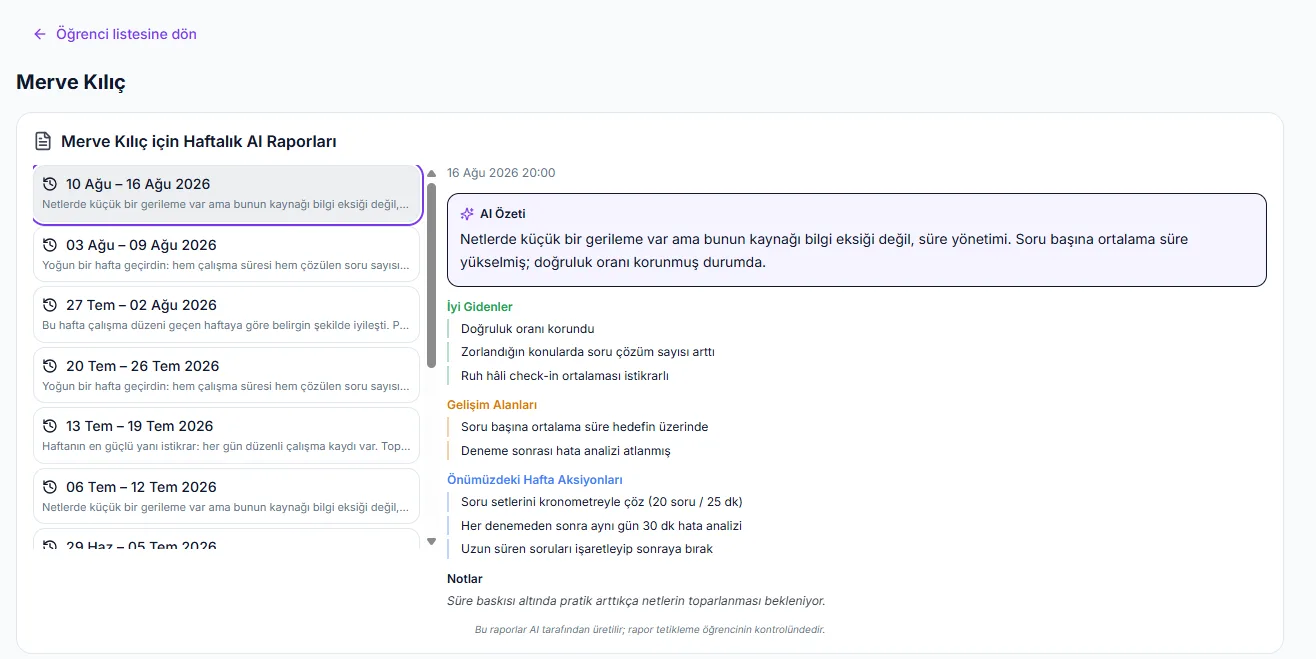
In the real product: the AI builds the weekly programme, the coach runs sessions, student and coach can belong to different institutions, and the coaching record survives a paused subscription.
How it works
Matching
In the Premium tier, your private tutor's referral code automatically links you to that coach, no separate approval step needed. In the Elite tier, you pick a coach from a directory and send a request; once the coach approves it, a session quota is reserved for you.
Approval and Activation
Your Elite request first waits for approval, then activates automatically once your payment completes. If the payment provider's redirect isn't guaranteed to return, the system lazily activates the relationship the next time your coaching status is checked.
Automatic Weekly Program
Once your coaching relationship is active, AI automatically builds your weekly study program based on your gaps, goals and calendar. Your exam goal and study goal are tracked separately, and you mark your progress lesson by lesson and topic by topic.
Sessions and Messaging
Your coach schedules, reschedules or cancels sessions, and marks each one completed or no-show. They message you directly, assign homework or exams, answer your questions, and can view your full analysis, report card and study program history.
Tracking and Reporting
Each week you get a progress report through a bespoke HTML email and a separate WhatsApp message; 12 distinct coaching notifications reach you in-app, by SMS, email and WhatsApp. If your subscription pauses temporarily, your coaching record isn't deleted, it just pauses and resumes automatically once payment continues.
What it offers each role
Student
You're matched automatically via your private tutor's referral code in the Premium tier, or by sending a request to a coach you choose from a directory in the Elite tier. You follow your automatically generated weekly program, message your coach directly, and receive weekly and monthly progress reports by both email and WhatsApp.
Teacher/Coach
You schedule, reschedule or cancel your matched student's sessions, and mark each one completed or no-show. You assign homework and exams, message the student directly, view their full analysis and study program, log manual installment/payment records, and track your own monthly coaching earnings.
- Automatic coaching connection via your private tutor's referral code in the Premium tier, no separate approval process.
- Elite tier marketplace: browse a coach directory, send a request, and get a session quota reserved once approved.
- Coaching requests go through an approval and payment step, and activate automatically on the next status check even if the payment redirect isn't guaranteed.
- If your subscription pauses temporarily, coaching isn't deleted, it reverts to PENDING and automatically reactivates once payment resumes.
- Students and coaches can be matched across different institutions (tenants), not limited to the same school.
- AI automatically builds your weekly study program based on your gaps, goals and calendar.
- Exam goals (score, net correct answers, ranking) and study goals (time, number of questions) are tracked separately.
- Your coach handles full session management: scheduling, rescheduling, cancelling, and marking sessions completed or no-show.
- 12 distinct coaching notifications (request received/approved/declined, matched, session scheduled/rescheduled/cancelled/reminder, etc.) go out in-app, by SMS, email and WhatsApp.
- The weekly progress report is delivered through a bespoke HTML email and a separate WhatsApp message, beyond the generic notification system.
Frequently asked questions
Coaching is available in the Premium and Elite tiers. In Premium, coaching starts automatically through your private tutor's referral code; in Elite, you browse a coach directory and send a request.
Premium matching is referral-based and automatic, with no separate approval step. In Elite, you send a request to a coach you choose from a directory, and once the coach approves it, a session quota is reserved for you.
No. If your subscription pauses temporarily, your coaching relationship isn't deleted, it's simply put on hold. Once your payment resumes, coaching reactivates automatically.
No, coaching isn't limited to a single institution. Students and coaches can be matched and work together even when registered at different institutions (tenants).
Coaching notifications, covering requests, approvals, matching, and session scheduling, rescheduling, cancelling and reminders, span 12 distinct types delivered in-app, by SMS, email and WhatsApp. Your weekly progress report is also delivered separately through a bespoke HTML email and a WhatsApp message.
Your coach schedules, reschedules or cancels sessions, and marks them completed or no-show. They can assign homework or exams, message you directly, and view your full analysis, report card, study program and progress reports.