

Feature
Live Lessons & Mentoring
Distance-free, trackable lessons through Google Meet and Zoom.
Last updated: August 17, 2026
Through the Google Meet and Zoom integration you create live lessons and meetings, with calendar entries and reminder notifications handled automatically. Recurring (series) lessons are supported on the Google Meet integration. The integration runs on the real Zoom and Google Calendar APIs, producing a separate host-start link for the teacher and a separate join link for the student. Attendance is checked against and deducted from the student's package hours, then flows automatically into the attendance score. At the Elite tier, one-on-one live coaching sessions with a real coach are also included.
Live preview
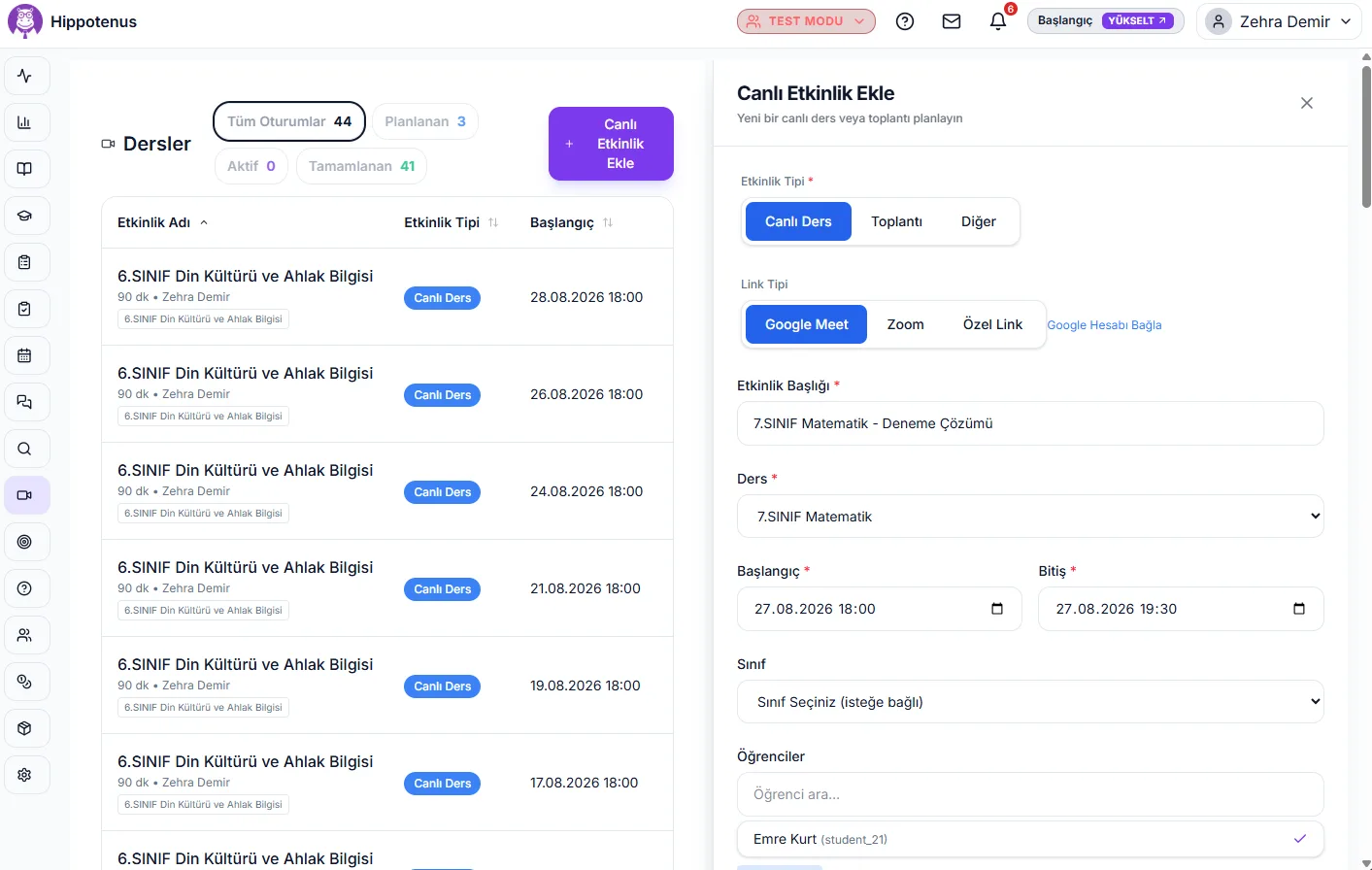
Schedule an event with the exact form the product uses, join in one tap, and have the recording and summary ready the moment the lesson ends. You can switch to the student and admin views too.
New live event
Event type*
Link type*
Subject*
Class / student*
Event title, start and end are required; a live lesson also needs a subject and a class/student. If you picked a custom link, enter the link too.
Fill in the form; the event you create, its join link and the post-lesson outputs will appear here.
Step 1/3 · Create the event
You pick the type, link type, title, subject, time and class; nothing is auto-assigned.
To be straight about it: chat, polls, Q&A, breakout rooms and recording are Zoom / Google Meet features — the call opens there. What Hippotenus owns is scheduling, the calendar and Google Calendar sync, the join link, the post-lesson summary and attendance; attendance is a separate module and is not wired to live lessons automatically.
How it works
Create the session
The teacher picks Zoom or Google Meet and sets the event type, title, subject, start and end time, then assigns a class or individual students.
Automatic calendar sync
Once the session is created, a calendar entry is generated automatically through the relevant API and reminder notifications are sent to participants. With Google Meet selected and a Google account connected, a recurring series can be created in one step.
Separate join links
The system produces a distinct host-start link for the teacher and a separate participant-join link for the student, so each side gets the correct entry point.
Package quota check
Before a student can enter the live class, the system checks their package or subscription quota, so attendance genuinely draws down the student's package hours.
Attendance flows to the score
The collected participation data is recorded automatically and flows into the student's attendance score, with no need for manual attendance marking.
Attendance review
Past sessions are listed; the teacher opens a single session, reviews the participation records and corrects them if needed. The automatically collected data is the starting point — the teacher has the final say.
What it offers each role
Student
Joins the live lesson through their own participant link. Before entry, the package quota is checked, so attendance is deducted from their package hours and automatically recorded to the attendance score.
Teacher
Creates and hosts live lessons through Zoom or Google Meet, can define a recurring series on Google Meet, and receives their own host-start link.
Parent
Sees which live lessons their child attended or missed through the parent tracking dashboard, getting attendance visibility without needing to join the session.
- A genuine dual integration with both Zoom and Google Meet through real APIs, not just a shared meeting link.
- A separate host-start link for the teacher and a separate join link for the student are generated automatically.
- Support for creating recurring (series) live lessons and meetings on the Google Meet integration.
- Calendar entries and reminder notifications are created automatically as soon as a session is set up.
- Live class attendance is checked against and automatically deducted from the student's package hours.
- Attendance data flows automatically into the attendance score, with no manual marking needed.
- The meeting room link is stored independently from the calendar entry, so it can be regenerated without breaking the calendar sync.
- Pick the event type: Lesson, Meeting or Other. On Meeting and Other a parent can be added as a participant, and the event shows in its own calendar colour.
- Automatically collected attendance can be reviewed and corrected by the teacher from the past session.
- One-on-one live coaching sessions with a real coach are included at the Elite tier.
Frequently asked questions
Both Zoom and Google Meet are supported. The integration runs on the real Zoom REST API and the Google Calendar API, and the teacher can choose either one when creating a lesson.
Hippotenus does not start lesson recordings. If you want recordings, you manage that directly in your own Zoom account settings; recordings stay on the Zoom side and are not transferred into Hippotenus.
Yes — connect your Google account and pick Google Meet as the link type to create a recurring series, so you don't need to add each lesson one by one.
Participation data from live lessons is collected automatically and flows into the student's attendance score, so the teacher doesn't need to take manual attendance.
Yes. Before a student joins a live lesson, the system checks their package or subscription quota and deducts the session from their package hours, so live lesson usage is metered rather than unlimited.
Yes, through the parent tracking dashboard a parent can see which live lessons their child attended.
Yes. Choose "Meeting" as the event type and a parent can be added to the participant list; the subject field is hidden and the event appears in its own calendar colour. The "Other" type uses the same participant rules.
Yes. Open the lesson from the past-sessions list to review and change the participation records; the automatically collected data is only a starting point.